The Felgo 4.4.0 update builds your Android apps against Android 16, which Google Play requires for new apps and app updates from August 31, 2026. The release also brings the OAuth 2.0 Plugin to macOS, Windows and Linux, and adds native Keychain access and Objective-C integration on macOS. Read on to learn more about the release.
- Android 16 Support for Google Play
- What You Need to Change in Your Project
- OAuth 2.0 for Desktop: macOS, Windows, and Linux
- Native macOS APIs: Keychain and NativeObject
- Keyboard Shortcuts for Desktop Navigation
- Felgo QML Hot Reload
- More Features and Improvements
- How to Update Felgo
Android 16 Support for Google Play
Felgo 4.4.0 builds Android apps against Android 16, API level 36. Google Play requires this for all new apps and app updates from August 31, 2026. You can request an extension until November 1, 2026 if you need more time.
The SDK covers the platform side. Your project needs a small number of one-time changes, which the next section lists in full.
Felgo Cloud Builds updates to Felgo 4.4.0 and Android 16 at the same time. Every app you build and deploy there meets the new Play Store requirement. You don't even need an Android toolchain on your own machine.
What You Need to Change in Your Project
Felgo 4.4.0 asks for a few one-time changes to your existing projects.
- Install the Android 16.0 SDK Platform (API level 36) and the matching 36.x Build-Tools.
- Opt out of predictive back navigation in your android/AndroidManifest.xml:
On Android 16, an app that intercepts the back button no longer receives it:<!-- ADD THIS ATTRIBUTE --> <application android:enableOnBackInvokedCallback="false" ... >onBackPressed()is not called andKEYCODE_BACKis not dispatched. Google describes this opt-out as temporary. - With Felgo 4.4.0, we removed the old config.json project configuration completely. All the settings are now configured by CMake options. Move your app name from qml/config.json into your CMakeLists.txt, then delete the JSON file:
# replaces the "title" entry of qml/config.json set(PRODUCT_TITLE "Your App")PRODUCT_TITLEsets the application nameQSettingsuses, so your stored settings move to a different location if you skip this step. The otherPRODUCT_*variables are already there from earlier Felgo versions. - Apply the changes for the features your project uses:
- qmake projects: Felgo 4.4.0 removes qmake support, and all Felgo projects use CMake. Follow the migration guide to convert your project.
- OAuth 2.0 on Android: register the callback intent filter on
OAuth2AuthActivityinstead ofFelgoActivity. - Games: add android:appCategory="game" to the application element, so your game keeps a fixed screen orientation on large Android 16 screens.
- Bluetooth Low Energy: discoveredDevices is now a QML model instead of a JavaScript array. Delegates read its roles directly:
// Before:
delegate: AppText { text: modelData.name + " (" + modelData.rssi + ")" }

// After: available roles are name, address, services and rssi
delegate: AppText { text: name + " (" + rssi + ")" }
- Finally, delete the android-build directory of your project, run CMake again, and build from scratch, so your project picks up the new configuration.
If you run into any issues while migrating, do not hesitate to contact us.
OAuth 2.0 for Desktop: macOS, Windows, and Linux
The OAuth 2.0 Plugin now supports macOS, Windows, and Linux. On macOS it uses ASWebAuthenticationSession, the same native authentication flow as iOS. On Windows and Linux it receives the OAuth callback on a local loopback server, as described in RFC 8252.
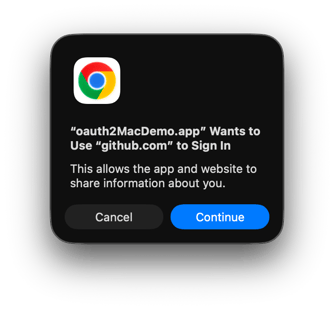 Your authentication code now runs on every platform Felgo targets. The same QML that signs a user in on a phone signs them in on a desktop app.
App startup has three possible outcomes, and this release gives each one its own handler. pluginLoaded turns true once the plugin has restored any stored tokens, so you can show a loading indicator until it does. After that, sessionNotFound fires when there is no previous session, and accessTokenReady fires when a stored token is valid and safe to use:
import QtQuick
import Felgo

App {
  OAuth2Client {
    id: oauth

    onSessionNotFound: loginPage.show()
    onAccessTokenReady: mainPage.show()
    onIsAuthenticatedChanged: if (!isAuthenticated) loginPage.show()
  }

  AppActivityIndicator { visible: !oauth.pluginLoaded }
}
If you inspect authStatus directly, note that it reports a new Initializing value until the plugin finishes loading.
isAuthenticated also stays true while a startup refresh is in progress, so your UI no longer flickers back to the login screen while tokens refresh.
For everyday use, getValidAccessToken() hands you a token that has not expired, and refreshes it first when needed. Call it before an API request instead of reading accessToken directly:
oauth.getValidAccessToken(function(token) {
  if (!token)
    return // refresh failed, or no refresh token available

  HttpRequest.get(userUrl)
    .set("Authorization", "Bearer " + token)
    .then(res => console.log(res.text))
})
tokensRefreshed and accessTokenExpired report what happened to the session, and authTimeout raises an error after 300 seconds by default, so the login screen no longer stays stuck when someone closes the browser without finishing.
Native macOS APIs: Keychain and NativeObject
The Keychain methods of NativeUtils now work on macOS as well. setKeychainValue, getKeychainValue, and clearKeychainValue reach the system Keychain through the Security framework, exactly as they do on iOS and Android.
NativeObject and NativeObjectUtils also support macOS now, so you can call Objective-C APIs directly from QML with the bridge you already use on iOS. Note that NativeView embedding is not yet supported on macOS.
Keyboard Shortcuts for Desktop Navigation
NavigationItem adds a shortcut property. Set a standard Qt key sequence and that shortcut switches to the tab:
Navigation {
  NavigationItem {
    title: "Home"
    icon: IconType.home
    shortcut: "Ctrl+1"

    NavigationStack { HomePage { } }
  }
}
Navigation.keyboardShortcutsEnabled and Navigation.showShortcutTooltip control both behaviors, and both are on by default on desktop.
Felgo QML Hot Reload
As usual, we also bring the latest improvements of Felgo Hot Reload to the SDK. This release covers general fixes and stability improvements.
More Features and Improvements
Felgo 4.4.0 includes many more improvements, for example:
- The Soomla Plugin now uses Google Play Billing Library 8.2.0. Google Play requires Billing Library 8 or higher from August 31, 2026. Your app needs no code changes.
- FirebaseAuth adds reauthenticateUser(), which unblocks security-sensitive operations like deleteUser() for a session restored on app start.
- AppModal exposes an isOpen property, consistent with AppOverlay.
- The highlight effect of AppToolTip can now match the ratio of its target component, or use a different one, with highlightRatio.
- AppTabButton titles gain capitalization, wrap mode, maximum line count, and horizontal alignment options, as component and theme properties.
- The TexturePacker components are now available in Felgo 4.
- and many more.
For all relevant changes, features, and fixes of recent Felgo updates, please check out the changelog.
How to Update Felgo
Try out these new features by following these steps:
- Open the Felgo SDK Maintenance Tool in your Felgo SDK directory.
- Choose "Update components" and finish the update process to get this release as described in the Felgo Update Guide.
- Update Felgo

If you haven't installed Felgo yet, you can do so now with the latest installer from here. Now you can explore all of the new features included in this release!
More Posts Like This
Felgo Hot Reload: Enhance your Qt Project Development with QML Code Reload
Release 4.3.0: Felgo QML Hot Reload, Android 15, Qt 6.8 & Qt Creator 17
QML Extension for Visual Studio: Qt Quick Syntax Highlighting and Autocompletion